Claude Code + Codex / For Mac

Where did that
chat go?

Search turns up nothing. Half-finished work gets buried for months.

Fleet puts your Claude Code and Codex sessions in one place, so you can find the conversation and resume it in your terminal.

Local app. Your chats never come to us.

Try the demo

$20 one-time. No subscription.

Your sessions, across projectsInteractive demo / Sample sessions
FleetLocal workspace
Find a chat and pick up where you left off.

All sessions 6

Recent first
orbit Claude Code
Needs your review

Polish the command menu

⌥ feat/command-menu2 min ago
Pick up where you left off

Demo workspaceClaude Code + Codex|No account needed to explore

Star an important chat, search “204”, or switch to Board to move work between columns.Sample conversations only. Changes reset on reload. Nothing connects to your agents.

Lost in the haystack.

You know you talked through this before. You search, open a few wrong chats, then end up explaining it all again. Fleet brings those conversations back into reach.

Search shouldn’t suck.

Search the actual conversation across Claude Code and Codex. A filename, an error, or something you remember saying should be enough to start looking.

Local semantic search finds related conversations when you remember the problem but not the wording. The search index stays on your Mac. No chats are sent to Fleet, and summaries aren’t required.

Try conversation search
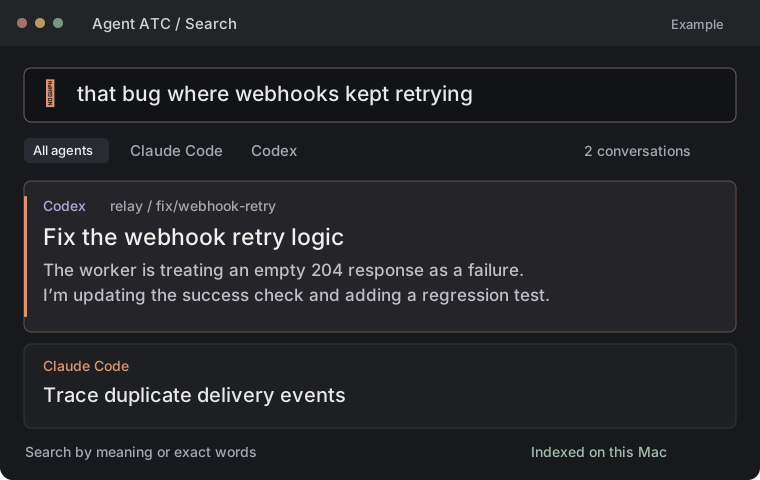
A search for that bug where webhooks kept retrying finds a Codex chat about failed 204 responses.
Local semantic searchEnlarge

Half done.
Three months ago.

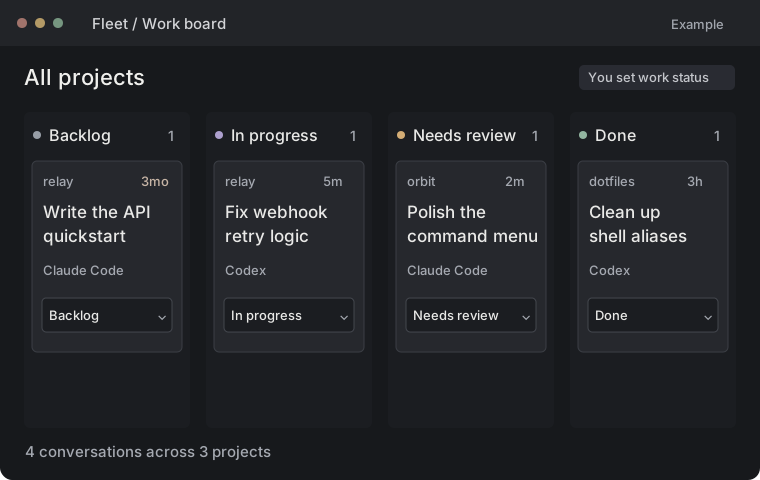
Keep unfinished work on a board. Move a chat through Backlog, In progress, Needs review, and Done without losing the conversation attached to it.

Open a card to get back to the conversation. You decide when the work moves on.

Four kanban columns show Backlog, In progress, Needs review, and Done. A three-month-old API quickstart is still in Backlog.
Work board · Sample sessionsEnlarge

Star the chats you need.

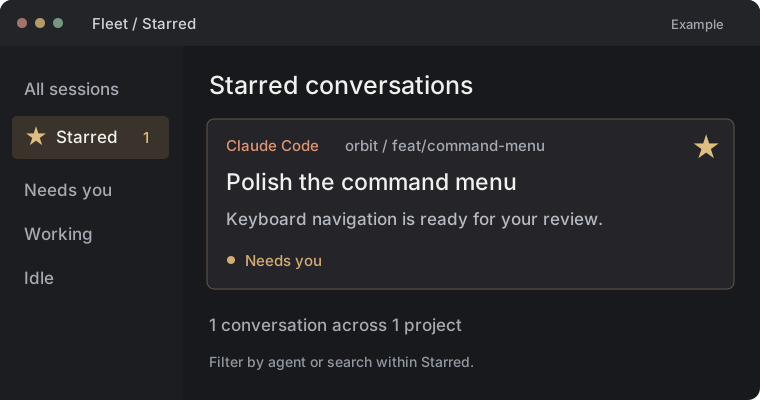
Star the conversation you know you’ll need again. Open Starred to find it without digging through everything else.

The Starred view keeps an important Claude Code command-menu conversation close, marked with a filled gold star.
Starred conversations · Sample contentEnlarge

See the token counts.

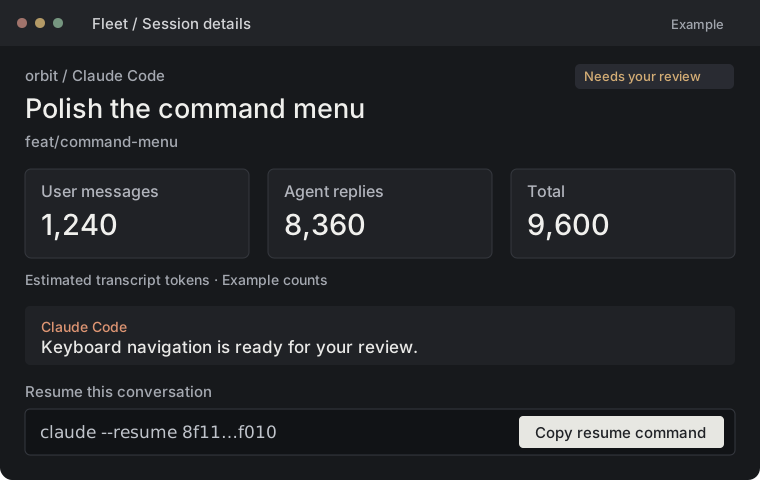
See token counts for your messages and agent replies, with estimates clearly marked. Copy the resume command when you’re ready to carry on.

Chat details show illustrative estimates of 1,240 user tokens, 8,360 agent tokens, and 9,600 total, plus a copy resume command button.
Token counts by roleEnlarge

Example counts. Transcript length is separate from model usage and billing.

Choose your AI reviewer.

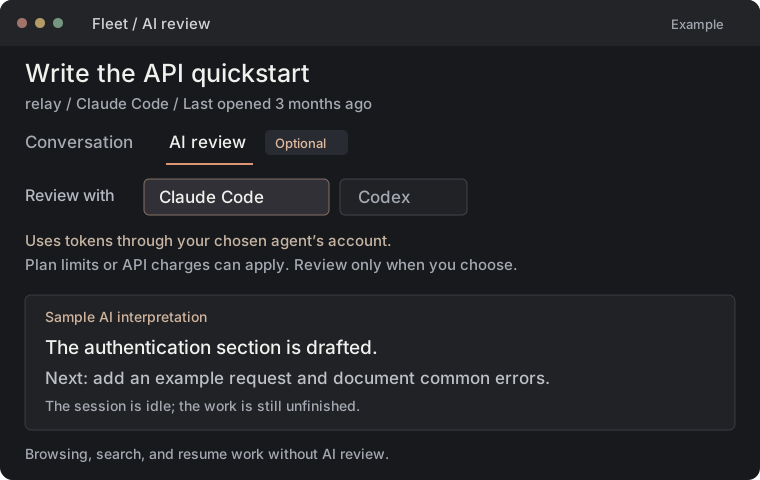
Use Claude Code or Codex to summarise a chat and identify open questions, blockers, and next steps. Spend less time rereading and see why a session may need your attention.

Reviews use tokens through the agent you choose, counting toward plan limits or API charges depending on your setup. AI review is optional. Browsing, search, stars, the board, and resume work without it.

Optional AI review offers a choice of Claude Code or Codex, explains token usage, and shows a sample next step for the API quickstart.
Optional AI review · Sample contentEnlarge

Questions

How much does Fleet cost?

Fleet costs $20 USD as a one-time purchase. There’s no Fleet subscription. Optional AI review uses tokens through your chosen Claude Code or Codex account; plan limits or separate API charges can apply.

Which agents does Fleet support?

Fleet works with Claude Code and Codex sessions stored on your Mac. Resuming a session requires the corresponding agent CLI to be installed.

Will it work on my Mac?

Fleet runs on Apple Silicon and Intel Macs. Claude Code or Codex must be installed to resume their sessions.

Can Fleet recover deleted chats?

Fleet finds conversations saved in your local session files. It cannot recover deleted transcripts or keep an agent running after a restart.

Do I have to start my agents inside Fleet?

No. Fleet reads the sessions your agents already save on this Mac. Keep starting Claude Code and Codex the way you do today, then use Fleet to find a conversation and copy its resume command. Fleet works with sessions on this Mac; it doesn’t control remote machines.

Do I have to use AI review?

No. Choose Claude Code or Codex when you want a summary and an AI assessment of what needs attention. Reviews use tokens and can count toward your plan limits or API charges. Before a review, Fleet shows the content being sent and the provider receiving it. AI findings are labeled as inferred. Browsing, search, stars, the board, and resume work without AI review.

Who changes the status on the board?

You do. The kanban board tracks whether work is in your backlog, in progress, ready for review, or done. This is separate from an agent’s activity: moving a card won’t start or stop an agent. Try changing a card’s status in the demo; sample changes last until you reload the page.

Where do my conversations go?

Your session library, search index, stars, and board stay on your Mac. None of your chat data comes to Fleet. If you choose AI review, the selected content goes through your Claude Code or Codex setup to its configured provider, such as Anthropic or OpenAI. Fleet never receives it. This website uses synthetic examples and never accesses your local conversations.

Fleet for Mac

$20 USD, one-time purchase.

For Apple Silicon and Intel Macs. No subscription.

Get Fleet for $20

Checkout isn’t connected in this local preview.